Framework Design
Framework Design
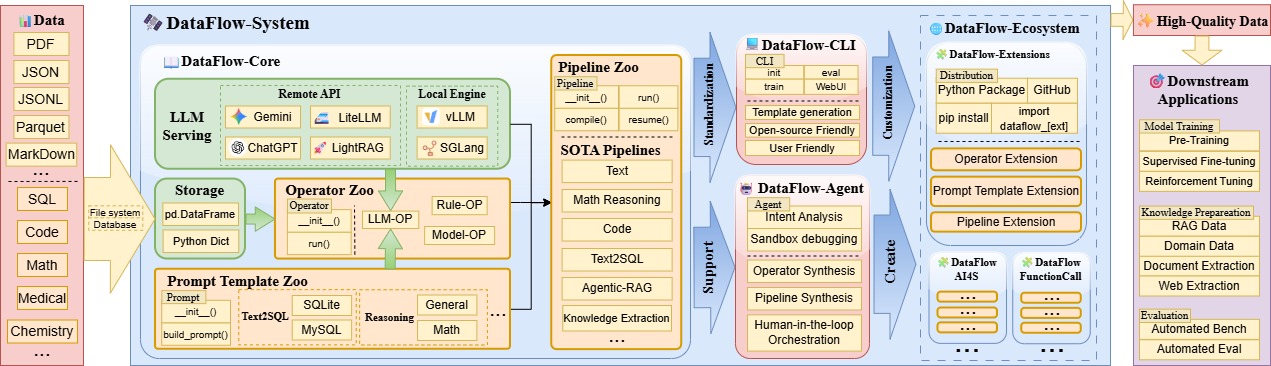
The core data processing logic of the Dataflow framework is mainly divided into the operator layer (operator) and the pipeline (pipeline) layer. In addition, components such as data management storage and large model backend LLMServing jointly provide support.
Furthermore, in order to use AI to assist data processing, we additionally added the Agent for Dataflow module. This module can:
- (1) Write new Dataflow operators according to requirements
- (2) Orchestrate existing Dataflow operators according to requirements to form Pipelines.
- (3) Automatically solve data analysis tasks through an Agent.
Data Management
DataFlow currently mainly focuses on the processing of large-model text data. To improve usability, the DataFlow kernel uses pandas DataFrame as the carrier to implement data reading and writing (essentially data carried in tabular form). Therefore, DataFlow supports common text dataset formats such as json, jsonl, csv, parquet, pickle as input and output. Data cleaning, augmentation, and evaluation are implemented by CRUD operations on DataFrame tables.
In essence, dataset management functionality is implemented by the storage class, with source code located in storage.py. Currently, the framework mainly relies on the file system as the carrier for data reading, writing, and caching. In the future, it will support database systems for reading and writing to support large-scale data processing.
Large Model Backend
Large-scale data augmentation, filtering, and scoring all require the powerful and flexible semantic understanding capabilities of large language models. Therefore, DataFlow provides the LLMServingABC abstract class to uniformly manage online/local large models and to facilitate model reuse among operators. The large model backends currently mainly include the following classes:
LocalModelLLMServing: Uses vLLM or SGLang as the inference backend, deploying supported large models locally on GPU as inference services. Suitable for lightweight single-machine usage.APILLMServing_request: Uses therequestmethod to send requests to APIs of online large model service providers (such as ChatGPT, Deepseek), supporting multi-process concurrent requests. It is also suitable for enterprise users who deploy large models in clusters based on frameworks such as Ray and request the corresponding APIs through this class.
DataFlow Operators
Definition of Operators
DataFlow operators are the basic processing units that operate on raw data, usually implemented based on rules, deep learning models, or large language models (LLMs). Taking the most basic operator PromptedGenerator as an example, this operator functionally imitates the way people call GPT, using the same prompt to batch-process batches of text.
 The specific logic is shown in the figure above. This operator reads question entries from the raw data, i.e., multiple questions represented by
 Q1, Q2..., batches them together with the user-defined System Prompt, and sends them to LLMServing for inference to obtain output answers, i.e., A1, A2.... After combining the above content into the following format, the task of this operator can be completed:
[
    {"question":"<Q1>", "Answer": "<A1>"},
    {"question":"<Q2>", "Answer": "<A2>"}
    ...
]
Code Style and Definition Specifications of Operator Classes
The design of DataFlow operators references the code style of PyTorch, making it easy to understand. The code block below shows the invocation code implementation of the above PromptedGenerator operator:
from dataflow.operators.core_text import PromptedGenerator

prompted_generator = PromptedGenerator(
    llm_serving=llm_serving # Pass in the LLMServing class as the large model backend; the definition of this class is omitted here
)

prompted_generator.run(
    storage = self.storage.step(), # The data management class; its definition is omitted here
    system_prompt = "Please solve this math problem.",
    input_key = "problem", # Read content from this field (column) of the DataFrame
    output_key= "solution" # Output results to this field (column) of the DataFrame
)
A Dataflow operator class needs to define the following three functions:
__init__function: Initialize necessary settings and hyperparameters;- If the operator uses a large model, it must pass it in through the
llm_servingfield in the__init__function. Operators are not allowed to declare large models internally.
- If the operator uses a large model, it must pass it in through the
runfunction: Has astorageparameter and multiple key parameters used to specify which columns of the DataFrame data table the operator will read/write. Other columns not involved will not participate in the operator logic.- The first parameter of the
runfunction must bestorage, and it must be passed the data management class to implement inter-operator communication and link all operators. - In the
runfunction, all parameter names exceptstoragemust be prefixed withinput_oroutput_, representing the input fields read by the operator and the output fields produced by the operator, respectively. - The values of the key parameters in the
runfunction can be flexibly specified by the user to adapt to the variable field naming of LLM datasets (e.g.,question,instruction,humanmay all be used to refer to human questions in multi-turn dialogues). In this case, settinginput_key="question",input_key="instruction", orinput_key="human"enables free reading of such datasets. - There should be no parameters other than
storageand various keys inside therunfunction. - If the operator only needs to read/write a single field, it is generally specified via
input_keyandoutput_key. - If the operator does not need to write output fields, there should be no
output_*parameters at all. - If multiple fields need to be read/written, parameter names are usually specified according to functionality, such as
input_question_key,input_answer_key,output_question_quality_key.
- The first parameter of the
The
get_descfunction can be called directly to obtain the operator’s functional description and parameter list description. Passingzhto thelangparameter returns a Chinese description, andenreturns an English description. This function can serve the Agent in understanding operator functionality.
Operator Classification Specifications
Dataflow operators currently adopt a two-level classification. More classification levels may lead to difficulties in categorization; current practice considers this to be relatively reasonable. If you have better classification methods, discussions via Issues are welcome.
Currently, the first-level classifications of operators in Dataflow are as follows:
|-- agentic_rag     # Agentic-RAG data synthesis
|-- chemistry       # Chemistry-related
|-- conversations   # Multi-turn conversations
|-- core_speech     # Core - speech
|-- core_text       # Core - text
|-- core_vision     # Core - vision
|-- general_text    # General - text
|-- knowledge_cleaning # Knowledge base cleaning (MinerU)
|-- reasoning       # Strong reasoning data
|-- text2sql        # Natural language to SQL
|-- text_pt         # Text - pretraining
`-- text_sft        # Text - supervised fine-tuning
The classification logic of the first-level categories is as follows:
Core operators: Reflect the core operators embodying the Dataflow design philosophy.
- Operators in other categories more or less reference the implementation of a
coreoperator.coreoperators can be considered abstractions of all operator logic in Dataflow, or concrete base classes of other operators (although no actual inheritance exists in code). - In theory,
coreoperators must be limited in number and relatively convergent. - Therefore, we recommend that all users new to Dataflow first learn and understand operators with the
core_*prefix. coreoperators are split by modality but collectively referred to ascoreoperators.
- Operators in other categories more or less reference the implementation of a
Domain operators: To implement multiple modalities, multiple domains, and multiple tasks, operators are categorized by specific tasks.
- Generally speaking, domain operators can be regarded as secondary encapsulations of
coreoperators, and correspondingcoreoperators can usually be found. These domain operators can all be equivalently replaced by filling in the parameters ofcoreoperators. - In theory, domain operators are unlimited in number and non-convergent, as each vertical domain has infinite evaluation and generation needs.
- However, domain operators in Dataflow are retained as all necessary operators to achieve the best performance of a certain pipeline, so they do not appear “infinite”.
- Therefore, we welcome users to fill in
coreoperators or customize new domain operators to meet their own “infinite” needs. We also encourage users to use the “known optimal” domain operators we provide to quickly implement required functionality.
- Generally speaking, domain operators can be regarded as secondary encapsulations of
The classification logic of the second level is first reflected through folders and file names, including the following four folders:
generate: Includes two paradigms:- The number of data entries remains unchanged; each entry gains a new Key whose corresponding value is a new long text segment. That is, adding new information and fields to each data item;
- Operator classes generally use the suffix
*Generator.
- The number of data entries increases, enriching the overall dataset.
- Operator classes generally use the suffix
*RowGenerator.
eval: Includes two paradigms:- The number of data entries remains unchanged; each entry gains a new field, which can be a score or category as an evaluation result;
- Operator classes generally use the suffix
SampleEvaluator.
- The number of data entries and field values remain unchanged; the entire dataset is evaluated, outputting a single overall evaluation metric.
- Operator classes generally use the suffix
DatasetEvaluator.
filter: Filters multiple data entries into fewer ones, with each entry’s content unchanged, or only with an additional field produced byeval.- Operator classes generally use the suffix
Filter.
- Operator classes generally use the suffix
refine: The number of data entries remains unchanged; each entry modifies a certain field.- Operator classes generally use the suffix
Refiner. Further specific functionalities
- Operator classes generally use the suffix
Examples of some operators: (specific operator names to be supplemented later)
- generate: Generate answers based on questions;
- eval: Score math problems by difficulty; classify subject categories of Q&A pairs;
- filter: Filter out entries with incorrect answers;
- refine: Remove URLs from text; remove emojis from text.
DataFlow Pipelines
Pipeline Overview
By combining various operators into pipelines, complex data governance tasks can be implemented. As shown in the schematic diagram of the “strong reasoning data synthesis pipeline” below, each rectangular unit can be regarded as an independent DataFlow operator, used to complete specific data processing tasks (such as augmentation, evaluation, filtering, etc.).
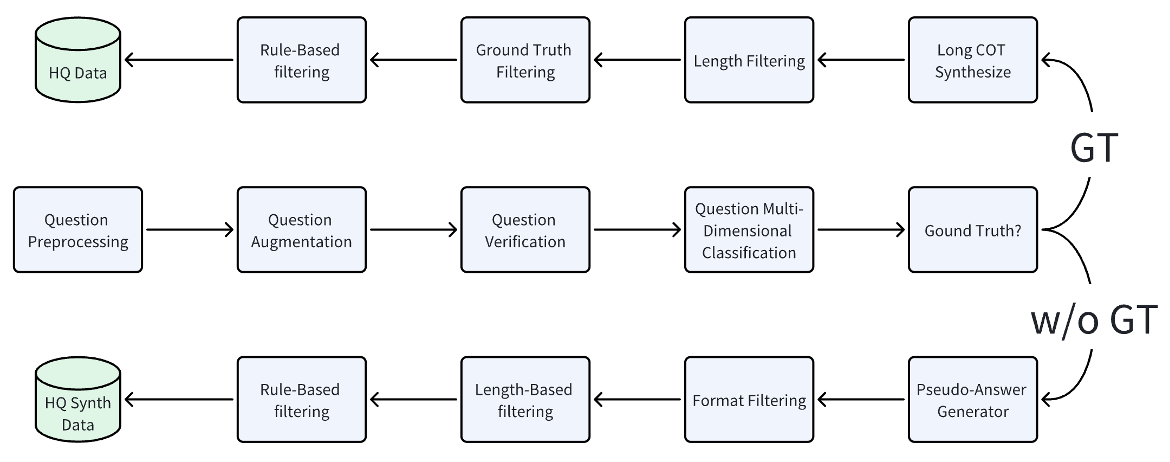
Pipelines in DataFlow are generally organized in the following paradigm, with overall code style still aligning with PyTorch. Taking the Reasoning pipeline used for synthesizing chain-of-thought data as an example, the complete pipeline code is as follows:
from dataflow.operators.reasoning import (
    ReasoningQuestionGenerator,
    ReasoningAnswerGenerator,
)
from dataflow.operators.reasoning import ReasoningQuestionFilter, ReasoningAnswerNgramFilter, ReasoningAnswerModelJudgeFilter
from dataflow.utils.storage import FileStorage
from dataflow.serving import APILLMServing_request
from dataflow.core import LLMServingABC
from dataflow.prompts.reasoning.general import (
    GeneralQuestionFilterPrompt,
    GeneralAnswerGeneratorPrompt,
    GeneralQuestionSynthesisPrompt,
    AnswerJudgePrompt,
)

class GeneralReasoning_APIPipeline():
    def __init__(self, llm_serving: LLMServingABC = None):

        self.storage = FileStorage(
            first_entry_file_name="../example_data/ReasoningPipeline/pipeline_general.json",
            cache_path="./cache_local",
            file_name_prefix="dataflow_cache_step",
            cache_type="jsonl",
        )

        # use API server as LLM serving
        self.llm_serving = APILLMServing_request(
                    api_url="http://api.openai.com/v1/chat/completions",
                    model_name="gpt-4o",
                    max_workers=30
        )

        self.question_filter_step1 = ReasoningQuestionFilter(
            system_prompt="You are an expert in evaluating mathematical problems. Follow the user's instructions strictly and output your final judgment in the required JSON format.",
            llm_serving=self.llm_serving,
            prompt_template=GeneralQuestionFilterPrompt()
        )

        self.question_gen_step2 = ReasoningQuestionGenerator(
            num_prompts=1,
            llm_serving=self.llm_serving,
            prompt_template=GeneralQuestionSynthesisPrompt()
        )

        self.answer_generator_step3 = ReasoningAnswerGenerator(
            llm_serving=self.llm_serving,
            prompt_template=GeneralAnswerGeneratorPrompt()
        )
        self.answer_model_judge_step4 = ReasoningAnswerModelJudgeFilter(
            llm_serving=self.llm_serving,
            prompt_template=AnswerJudgePrompt(),
            keep_all_samples=True
        )
        self.answer_ngram_filter_step5 = ReasoningAnswerNgramFilter(
            min_score = 0.1,
            max_score = 1.0,
            ngrams = 5
        )

    def forward(self):
        self.question_filter_step1.run(
            storage = self.storage.step(),
            input_key = "instruction",
        )

        self.question_gen_step2.run(
            storage = self.storage.step(),
            input_key = "instruction",
        )
        self.answer_generator_step3.run(
            storage = self.storage.step(),
            input_key = "instruction",
            output_key = "generated_cot"
        ),
        self.answer_model_judge_step4.run(
            storage = self.storage.step(),
            input_question_key = "instruction",
            input_answer_key = "generated_cot",
            input_reference_key = "golden_answer"
        ),
        self.answer_ngram_filter_step5.run(
            storage = self.storage.step(),
            input_question_key = "instruction",
            input_answer_key = "generated_cot"
        )

if __name__ == "__main__":
    pl = GeneralReasoning_APIPipeline()
    pl.forward()
Currently, DataFlow provides multiple preset Pipelines to accomplish predefined functions. Once you are familiar with the DataFlow framework, you can freely combine existing operators or design your own new operators to build a pipeline suitable for your data processing.
Precompiled Pipelines
The “conventions” of the above pipeline are actually quite loose. The __init__ function and the forward function are just two simple functions and do not inherit from any special base class to impose additional checks.
This loose design makes it easier for users to implement their own functions later and integrate their business code. However, when using Dataflow-Agent or building complex pipelines, it is necessary to pre-check the keys filled in for each operator. Otherwise, when executing large amounts of data and operators, it is extremely frustrating for the program to exit due to a KeyError exception triggered only at an intermediate operator.
Therefore, we provide a more effective compile() function to offer “pre-run checks” for pipelines. In the future, we will also provide more technical optimizations for this function. Currently, its functionality is limited to checking whether operator key fillings are reasonable, to reduce the number of Agent debug iterations.
Specifically, below is an example of Pipeline precompilation in Dataflow. This example implements a pipeline that translates English input into Chinese, Japanese, and Korean output. Please pay special attention to the highlighted lines, which implement the main logic of precompilation:
# https://github.com/OpenDCAI/DataFlow/blob/main/test/test_autoop_graph.py

from dataflow.pipeline import PipelineABC
from dataflow.operators.core_text import PromptedGenerator
from dataflow.serving import APILLMServing_request, LocalModelLLMServing_vllm, LocalHostLLMAPIServing_vllm
from dataflow.utils.storage import FileStorage

class AutoOPPipeline(PipelineABC):
    def __init__(self):
        super().__init__()
        self.storage = FileStorage(
            first_entry_file_name="../dataflow/example/GeneralTextPipeline/pt_input.jsonl",
            cache_path="./cache",
            file_name_prefix="dataflow_cache_auto_run",
            cache_type="jsonl",
        )
        self.llm_serving = LocalModelLLMServing_vllm(
            hf_model_name_or_path="/mnt/public/model/huggingface/Qwen3-0.6B"
        )
        self.op1 = PromptedGenerator(
            llm_serving=self.llm_serving,
            system_prompt="Translate following content into Chinese:",
        )
        self.op2 = PromptedGenerator(
            llm_serving=self.llm_serving,
            system_prompt="Translate following content into Korean:",
        )
        self.op3 = PromptedGenerator(
            llm_serving=self.llm_serving,
            system_prompt="Translate following content into Japanese:"
        )

    def forward(self):
        self.op1.run(
            self.storage.step(),
            input_key='raw_content',
            # output_key='content_CN'
            output_key="raw_content"
        )
        self.op2.run(
            self.storage.step(),
            input_key='raw_content',
            # input_key="raw_content",
            output_key='content_JA'
        )
        self.op3.run(
            self.storage.step(),
            input_key='raw_content',
            output_key='content_KR'
        )

if __name__ == "__main__":
    pipeline = AutoOPPipeline()
    pipeline.compile()
    print(pipeline.llm_serving_list)
    print(pipeline.llm_serving_counter)
    pipeline.draw_graph(port=8081, hide_no_changed_keys=True)
    pipeline.forward() # Normal execution
In summary, to achieve precompilation, the following details need to be implemented in the Pipeline class:
The Pipeline class must inherit from
dataflow.pipeline.PipelineABCand callsuper().__init__()in the__init__function to enable necessary decorators.At runtime, call
pipeline.compile()to start compilation, which converts the dynamic operator topology into a static graph and pre-checks operator logic and key logic, i.e., pre-run checks. There is no need to wait until execution reaches that operator to report logic errors.- For example: in the above example, if I change the
input_keyofop3.runtoraw_input, then theoretically this key does not exist in the data table and cannot be found. At this time, executing compile will throw the following exception in advance, efficiently helping the Agent reduce debugging rounds:
2025-09-23 12:54:36,686 | Pipeline.py - Pipeline - _build_operator_nodes_graph- 133 - DataFlow | WARNING | Processno 1956836 - Threadno 140493607409472 : Key Matching Error in following Operators during pipeline.compile(): - Input key 'raw_inputs' in `op3` (class <PromptedGenerator>) does not match any output keys from previous operators or dataset keys. Check parameter 'input_key' in the `op3.run()`.- For example: in the above example, if I change the
After compilation, the operator topology becomes a static graph topology. Executing
pipeline.forward()will normally execute the logic.In particular, running
pipeline.draw_graph()will automatically help you draw the topology of the current pipeline on a canvas. This command will automatically open a browser on the specified port and provide an interactive HTML dynamic page that can be dragged and viewed, allowing users to check whether the operator logic organization of the current pipeline code is correct. The HTML topology visualization built by the above example is as follows: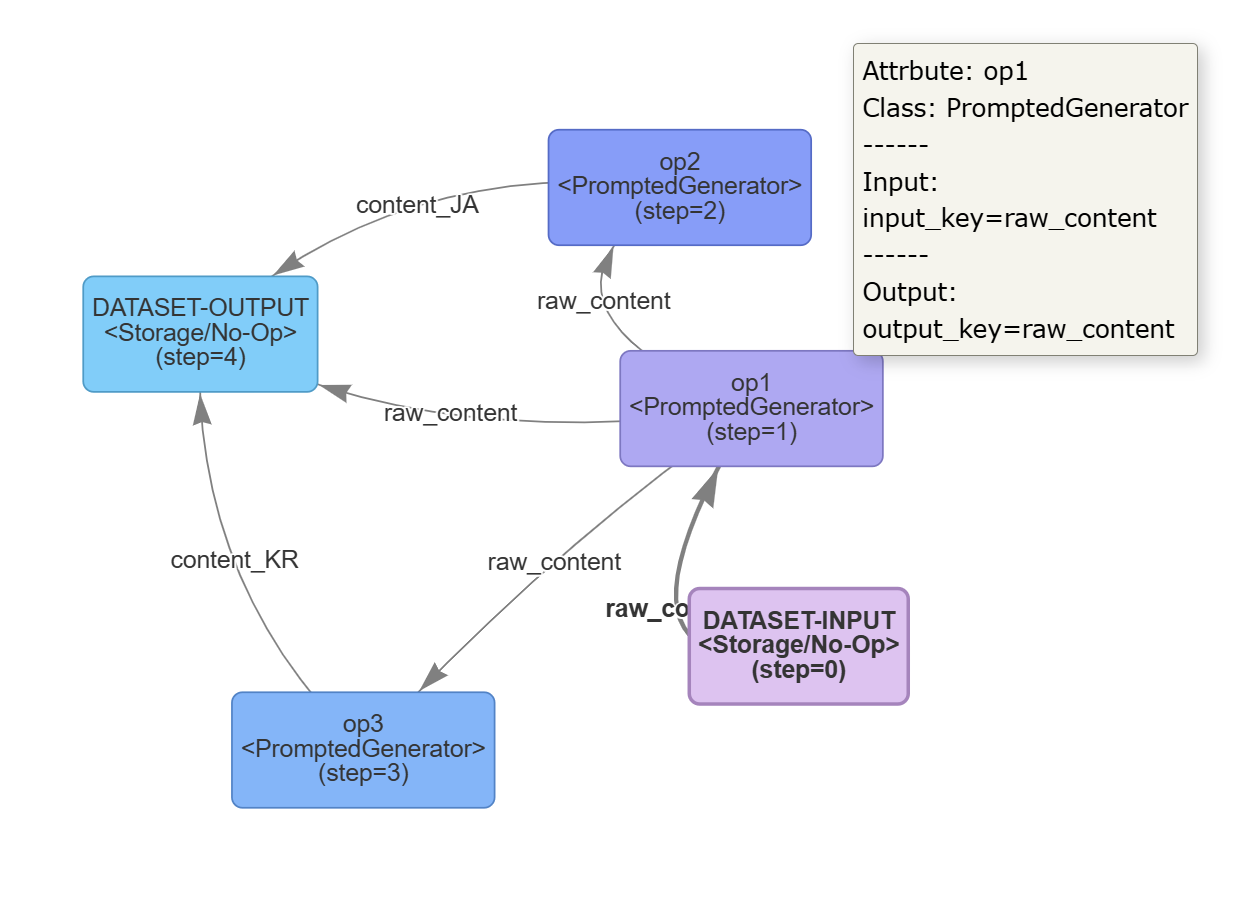
- Each node represents an operator, or a dataset input/output node.
- The
(step=n)in parentheses indicates the execution order of each node’s run function. In particular, operator colors will gradually change from purple to blue according to increasing step values, for intuitive observation. - Hovering the mouse over an operator allows you to see detailed information about that operator.
Breakpoint Resume Pipelines (Resume)
In actual pipeline debugging and development, it is common to encounter situations where an intermediate operator has a bug that causes interruption. In such cases, you can use the resume feature to skip previous operators and continue inference of the entire pipeline from the operator you wish to resume.
This feature relies on the compile() function. The reference implementation is as follows:
# https://github.com/OpenDCAI/DataFlow/blob/main/test/test_autoop_graph.py

from dataflow.pipeline import PipelineABC
from dataflow.operators.core_text import PromptedGenerator
from dataflow.serving import APILLMServing_request, LocalModelLLMServing_vllm, LocalHostLLMAPIServing_vllm
from dataflow.utils.storage import FileStorage

class AutoOPPipeline(PipelineABC):
    def __init__(self):
        super().__init__()
        self.storage = FileStorage(
            first_entry_file_name="../dataflow/example/GeneralTextPipeline/pt_input.jsonl",
            cache_path="./cache",
            file_name_prefix="dataflow_cache_auto_run",
            cache_type="jsonl",
        )
        self.llm_serving = LocalModelLLMServing_vllm(
            hf_model_name_or_path="/mnt/public/model/huggingface/Qwen3-0.6B"
        )
        self.op1 = PromptedGenerator(
            llm_serving=self.llm_serving,
            system_prompt="Translate following content into Chinese:",
        )
        self.op2 = PromptedGenerator(
            llm_serving=self.llm_serving,
            system_prompt="Translate following content into Korean:",
        )
        self.op3 = PromptedGenerator(
            llm_serving=self.llm_serving,
            system_prompt="Translate following content into Japanese:"
        )

    def forward(self):
        self.op1.run(
            self.storage.step(),
            input_key='raw_content',
            # output_key='content_CN'
            output_key="raw_content"
        )
        self.op2.run(
            self.storage.step(),
            input_key='raw_content',
            # input_key="raw_content",
            output_key='content_JA'
        )
        self.op3.run(
            self.storage.step(),
            input_key='raw_content',
            output_key='content_KR'
        )

if __name__ == "__main__":
    pipeline = AutoOPPipeline()
    pipeline.compile()
    pipeline.forward(resume_step=2) # Start running from the operator with index 2, i.e., op3 #
After compile(), passing the resume_step parameter to the forward() function allows resuming pipeline inference from the corresponding step, defaulting to 0. This requires that the pipeline has been run at least up to the previous operator, with corresponding previous *_step_*.json outputs available as input.
DataFlow Prompts and Prompt Templates (Prompt & Prompt Template)
Definition and Functionality
In large-model data governance, prompts are an important component. To better reuse operators, we provide prompts and prompt templates to support operator functionality. Their definitions are as follows:
- Prompt: A prompt that is hard-coded inside an operator and generally does not require obvious replacement.
- Prompt Template: A template that may require additional input information to compose a complete prompt; or a design where an operator achieves different functionalities by switching between different prompt templates to meet flexible and diverse requirements.
- In general, prompts and prompt templates have a many-to-one mapping relationship with operators. Multiple prompts may simultaneously or mutually exclusively support the functionality of a single operator.
In particular, even if an operator internally contains only one very concise prompt that is hard-coded, DataFlow still expects this prompt to be created as a separate class and registered. This facilitates global inspection of the relationships between prompts and operators, and allows them to be provided to agents or users as a global reference for writing new prompts and assembling them into the corresponding operators.
Code Implementation
First, all prompts and prompt templates in DataFlow are placed under the path ./dataflow/prompts, organized into Python files named after their corresponding pipelines.
Whether it is a prompt or a prompt template, it must inherit from
dataflow.core.prompt.PromptABC.
class PromptABC():
    def __init__(self):
        pass
    def build_prompt(self):
        raise NotImplementedError

class DIYPromptABC(PromptABC):
    def __init__(self):
        super().__init__()
    def build_prompt(self):
        raise NotImplementedError
The difference between the two is as follows:
PromptABCis the base class inherited by all prompt templates provided by official developers in the DataFlow main repository. It is used to strictly constrain the one-to-many relationship between operators and prompt templates, i.e., enforcing that an operator can only accept certain templates.- If users need to define new templates themselves, modifying the official repository definitions would be very inconvenient. Therefore,
DIYPromptABCis provided as a base class for repository users who want to define similar, new prompt templates. Classes inheriting fromDIYPromptABCcan, by default, accept any template with aprompt_templateparameter, without being affected by DataFlow’s system type checking. Of course, users still need to refer to the parameter passing style and usage of existing official prompt templates to implement their own.
Overall, the convention is relatively simple: all prompts and prompt templates only need to implement the build_prompt function. Operators construct the required prompt by calling build_prompt. The parameter lists of __init__ and build_prompt can be freely designed and extended as needed.
When defining an actual prompt template, it must be registered via PROMPT_REGISTRY under dataflow.utils.registry:
from dataflow.utils.registry import PROMPT_REGISTRY
from dataflow.core.prompt import PromptABC

@PROMPT_REGISTRY.register()
class DemoPrompt(PromptABC):
    '''
    The prompt for the answer generator.
    '''
    def __init__(self):
        pass

    def build_prompt(self, question: str) -> str:
        """
        Generate system prompt information for a given math question
        """
        prompt =  r'''You are helpful agent'''
Further, when a prompt is applied to its corresponding operator, the operator class declaration must be decorated with the prompt_restrict decorator from dataflow.core.prompt. This step establishes the mapping between operators and prompts in DataFlow.
from dataflow.utils.registry import OPERATOR_REGISTRY
from dataflow import get_logger
from dataflow.core import OperatorABC
from dataflow.utils.storage import DataFlowStorage
from dataflow.core import LLMServingABC

from dataflow.core.prompt import DIYPromptABC
from dataflow.prompts.reasoning.math import MathQuestionFilterPrompt
from dataflow.prompts.reasoning.general import GeneralQuestionFilterPrompt
from dataflow.prompts.reasoning.diy import DiyQuestionFilterPrompt

from dataflow.core.prompt import prompt_restrict

import re
@prompt_restrict(
    MathQuestionFilterPrompt,
    GeneralQuestionFilterPrompt,
    DiyQuestionFilterPrompt
)
@OPERATOR_REGISTRY.register()
class ReasoningQuestionFilter(OperatorABC):
    def __init__(self,
                 system_prompt: str = "You are a helpful assistant.",
                 llm_serving: LLMServingABC = None,
                 prompt_template = MathQuestionFilterPrompt | GeneralQuestionFilterPrompt | DiyQuestionFilterPrompt | DIYPromptABC
                 ):
        self.logger = get_logger()
        if prompt_template is None:
            prompt_template = MathQuestionFilterPrompt()
        self.prompt_template = prompt_template
        self.system_prompt = system_prompt
        self.llm_serving = llm_serving
        self.empty_responses_count = 0  # add empty response counter
        ...
This step involves the following details, referring to the highlighted parts above:
- The
prompt_restrictdecorator must be given all prompt classes that this operator can hold. - If the operator intends to expose replaceable prompt templates for users to supply different functional prompts, then the operator’s parameter list must include a field named
prompt_template, and Python type annotations should be used to indicate the available options. - If the operator’s internal prompt is hard-coded, it still needs to use
@prompt_restrict, but the parameter list does not need to be modified.
Notably, after completing the prompt_restrict type annotation, the operator will have an additional member ALLOWED_PROMPTS. You can obtain the selectable prompts or prompt templates for the operator in the following way. This is also how DataFlow establishes the one-to-many mapping relationship from operators to prompts. Moreover, the prompt_template parameter must be filled with either official classes listed here or user-defined prompts that inherit from DIYPromptABC. DataFlow will perform runtime checks when the operator executes.
from dataflow.operators.reasoning import ReasoningQuestionFilter
op1 = ReasoningQuestionFilter()
print(op1.ALLOWED_PROMPTS)
The output will be:
 2025-09-24 16:25:07,928 | registry.py         - registry            - __getattr__         -   273 - DataFlow   |     INFO | Processno 1986103 - Threadno 140565043730240 : Lazyloader ['dataflow/operators/reasoning/'] trying to import ReasoningQuestionFilter
(<class 'dataflow.prompts.reasoning.math.MathQuestionFilterPrompt'>, <class 'dataflow.prompts.reasoning.general.GeneralQuestionFilterPrompt'>, <class 'dataflow.prompts.reasoning.diy.DiyQuestionFilterPrompt'>)
DataFlow Data Statistics
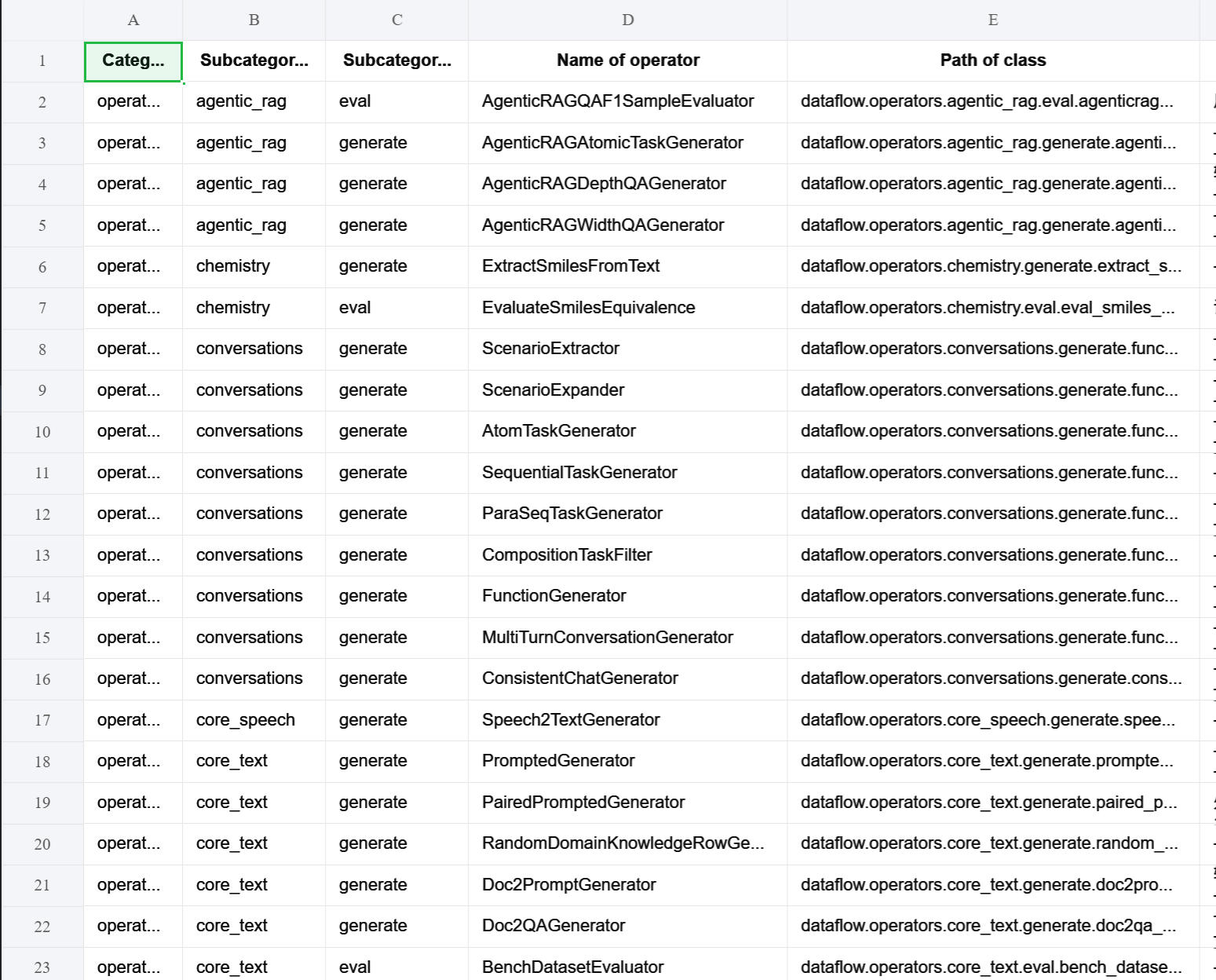
In particular, you can quickly export Excel tables to view the current status of all operators and prompt templates in DataFlow through these Python scripts. The result after running is as follows—feel free to try it out:
DataFlow Agent
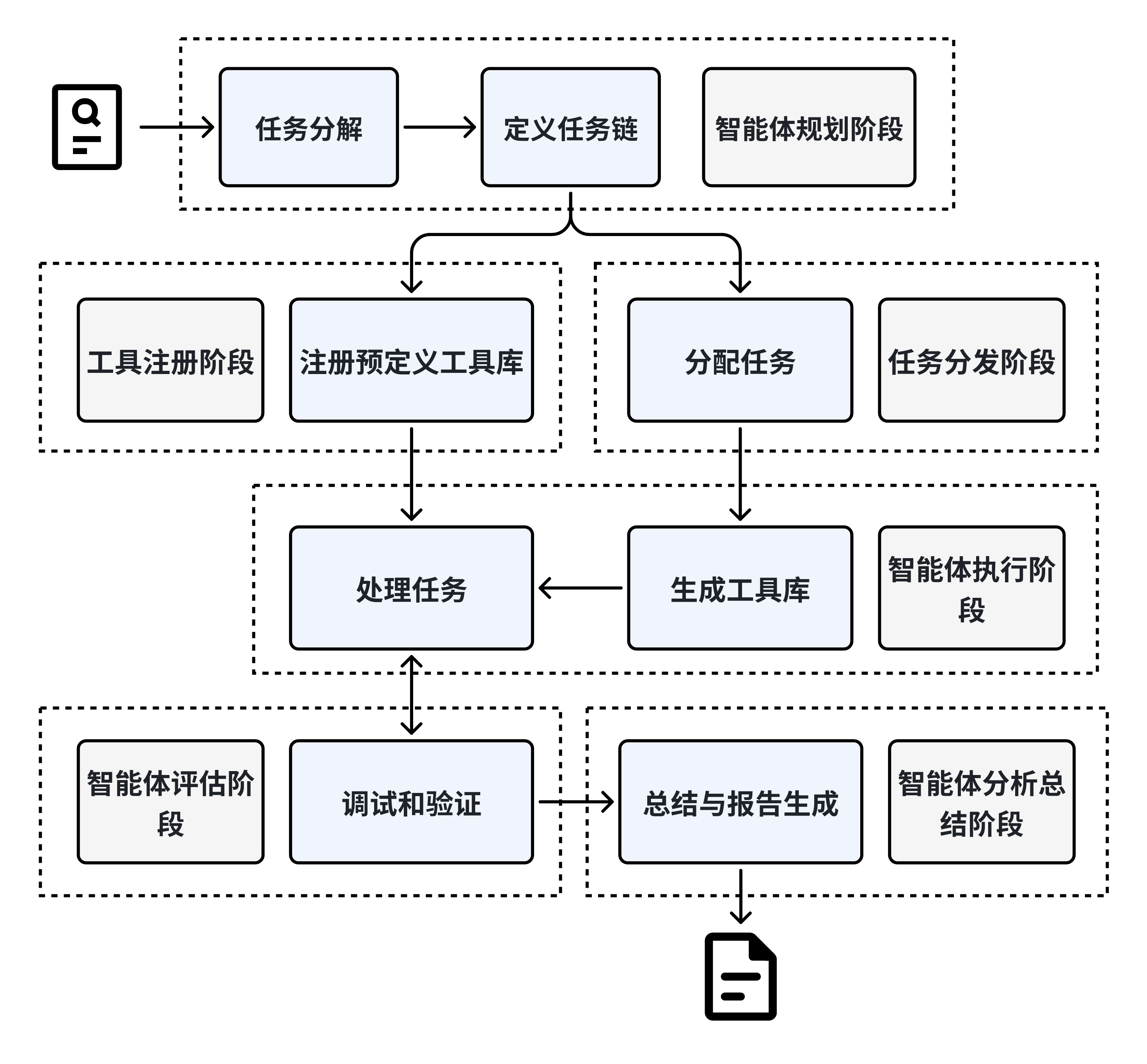
DataFlow Agent is an automated task processing system based on multi-agent collaboration, covering the complete process of task decomposition → tool registration → scheduling and execution → result verification → report generation, and is committed to intelligent management and execution of complex tasks. Its core modules include:
- Planning Agent: Understands user intent and decomposes high-level requirements into concrete executable task chains;
- Tool Register: Dynamically manages existing and newly generated tools (such as operators, models, or scripts);
- Task Dispatcher: Assigns tasks to Execution Agents, supporting automatic code generation and debugging;
- Execution Agent: Executes specific tasks, performing data processing, model invocation, etc.;
- Evaluation Agent: Evaluates the quality and correctness of execution results;
- Analysis Agent: Summarizes processes and results and generates structured reports.
The system supports short-term and long-term memory mechanisms, maintaining multi-round interaction states. While ensuring standardized processes, it has a high degree of dynamic adaptability, making it especially suitable for complex scenarios requiring multi-stage collaboration, such as data governance and automated data analysis.