

Quick Start – Ecosystem
Overview
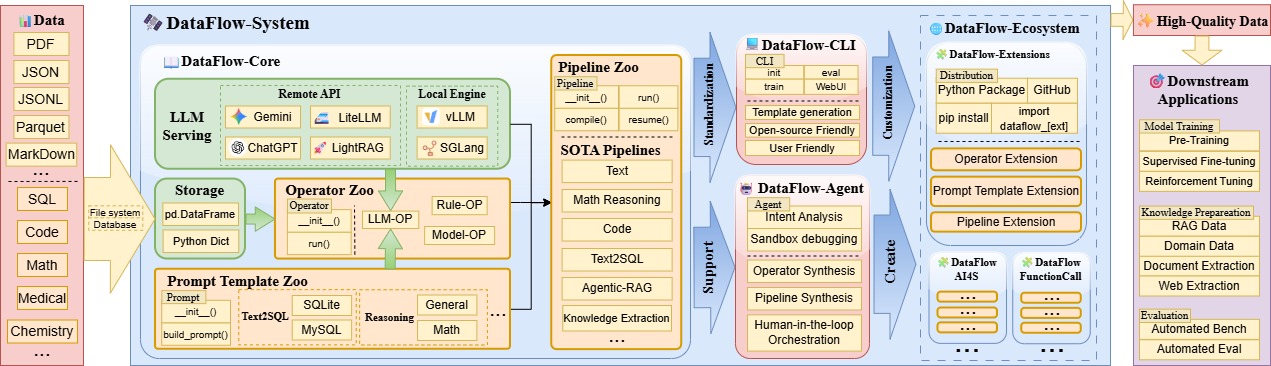
As shown in the diagram, the vision of DataFlow is:
Operator Library + Prompt Library + Pipeline Library =
<DataFlow-Extension>- Mature operators, prompts, and composed pipelines form individual DataFlow Extensions, each serving specific domains and tasks.
<DataFlow-Extension>+ ... +<DataFlow-Extension>=<DataFlow-Ecosystem>- By distributing different
DataFlow-Extensions via GitHub repositories or PyPI—each containing a large number of mature pipelines for various vertical domains and needs—you can build a completeDataFlow-Ecosystem. Users can distribute or compose pipelines on demand to obtain exactly what they need.
- By distributing different
CLI Tool: dataflow init repo
To help users build and distribute their own pipelines and corresponding operator libraries, we provide a command-line “scaffolding” tool to quickly generate a repository template. You can run the following command in an empty directory:
dataflow init repoAfter running this command, you will be guided through a series of prompts to automatically generate a distributable repository template:
  [1/8] repo_name (my-dataflow-extension):  # Name of the repository folder
  [2/8] package_name (my_dataflow_extension):  # Python package name
  [3/8] author (Your Name): # Your name, shown in README and pyproject.toml
  [4/8] description (A DataFlow extension with operator + prompt + pipeline):  # Brief description in README.md
  [5/8] init_version (0.0.1):  # Initial version of the Python package
  [6/8] Select license  # Open-source license
    1 - Apache-2.0
    2 - MIT
    3 - BSD-3-Clause
    4 - Proprietary
    Choose from [1/2/3/4] (1):

  # Default Python version (minimum required)
  [7/8] Select python_version
    1 - 3.10
    2 - 3.11
    3 - 3.12
    Choose from [1/2/3] (1):

  # Generate sample operators or only the directory structure
  [8/8] Whether include example operator & pipeline & prompt_template files in this DataFlow-extension template?
    1 - yes
    2 - no
    Choose from [1/2] (1):
Applied license: Apache-2.0
After completion, a full repository will be generated. You can then run the following command in the repository root to install it locally:
pip install -e .This installs the current repository in editable mode, so all changes will take effect immediately.
Additionally, you can initialize a default GitHub repository for future releases with:
git init
git add .
git commit -m "Initial commit"
Using a DataFlow-Extension
For convenience in the following explanation, assume the installed extension’s Python package name is df_123.
Unlike the lazy-loaded operators in the main DataFlow repository, repositories generated by the DataFlow CLI will, by default, scan and import all operators under the df_123/operator path. These operators are then registered in the main DataFlow registry.
If you want to inspect how these new operators appear in the registry, you can use the following script:
# Main repository registry
from dataflow.utils.registry import OPERATOR_REGISTRY

# Import the new extension repository; this imports all registered operators
import df_123

# After execution, extension operators will appear here
print(OPERATOR_REGISTRY._obj_map.keys())
In this way, the extension package integrates seamlessly with the main DataFlow repository, enabling true plug-and-play extensibility. After distribution via GitHub and PyPI, using and composing pipelines becomes extremely convenient, forming a complete ecosystem built on DataFlow.