

DataFlow-WebUI
Overview
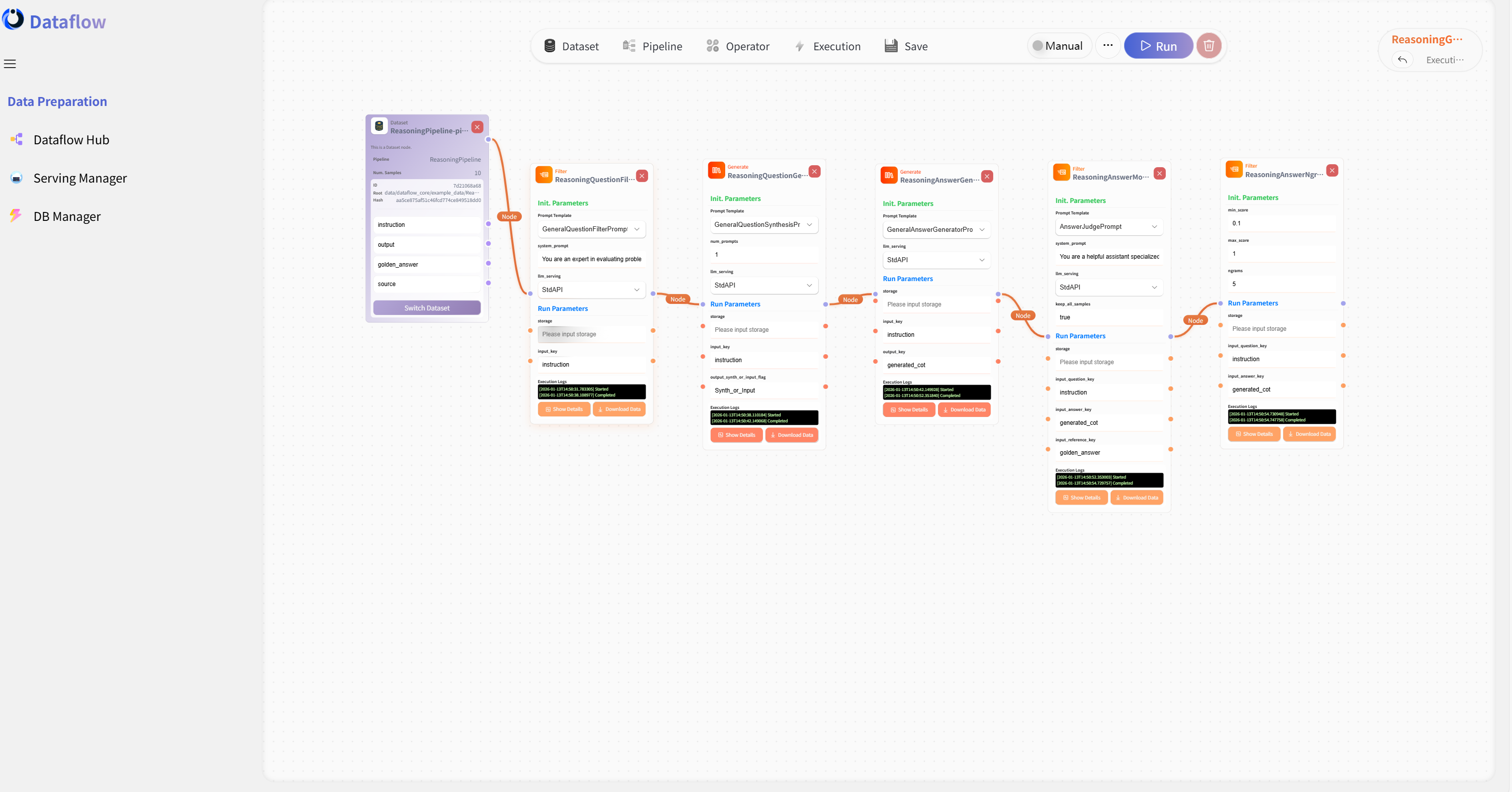
To make it easier for users who are not familiar with coding to intuitively experience the design of DataFlow operators and pipelines, we have carefully developed a fully functional DataFlow WebUI with both frontend and backend support. The technology stack uses Vue + FastAPI for the frontend and backend respectively.
The backend wraps the operators and Pipelines from the DataFlow Python library and executes tasks via Ray. In addition, DataFlow-WebUI is provided as an open-source project, serving as a reference for building workflow orchestration frameworks.
Features
- Built specifically for DataFlow, with built-in DataFlow pipeline capabilities and sample datasets. You can start experiencing it immediately after installation.
- Supports intuitive pipeline orchestration on a canvas through drag-and-drop operations. Users can compose operators into pipelines, run them, monitor execution status in real time, and download the resulting data.
- Currently, only API-deployed large model backends are supported. If you want to use local models, you can first deploy them as services via vLLM or SGLang, and then configure API access.
- As a research-oriented open-source project, the WebUI focuses on simplicity and maintainability. Therefore, business-oriented features such as user management and multi-concurrency queues are not included. It is mainly intended for local deployment and experimentation.
Usage
First, follow the installation guide to install the main DataFlow repository. After installation, you can start the DataFlow WebUI by running the following command:
dataflow webuiYou can also manually modify the port, URL, or use downloaded ZIP file or exist file path to run WebUI. For detailed options, use the -h flag:
dataflow webui -hThe system will then automatically download the latest release of DataFlow-WebUI from GitHub Releases, extract it locally, and start the service. Once deployment is complete, your browser should open automatically. If it does not, you can manually visit:
http://localhost:<port>/to access the WebUI.
We provide tutorial documentation on how to use the WebUI. Please refer to:
- Chinese Tutorial: https://wcny4qa9krto.feishu.cn/wiki/F4PDw76uDiOG42k76gGc6FaBnod
- English Documentation: https://wcny4qa9krto.feishu.cn/wiki/SYELwZhh9ixcNwkNRnhcLGmWnEg
Note: If you are interested in the specific frontend and backend implementation, or in the GitHub Actions configuration for automated releases, and would like to explore the source code, please refer to: https://github.com/OpenDCAI/DataFlow-webui
Extending WebUI Operator Library with DataFlow-Ecosystem
The DataFlow-Extension operator library implemented in the previous section can be introduced into the WebUI for use through registration.
First, locate the backend/app/core/config.py file in the downloaded and extracted DataFlow-WebUI directory. In the _DATAFLOW_EXTENSIONS section, add the string of Python package name of your DataFlow-Extension, and ensure that the package is installed in your current Python environment. For example, if your custom package name is df_sunnyhaze, it should be modified as follows:
    # Please input your custom DataFlow extensions here, the system will try to dynamically load them at runtime
    _DATAFLOW_EXTENSIONS = [
        "df_sunnyhaze"
    ]
You can import multiple dependency packages. After adding them, restart the WebUI service, and you should see the operators from DataFlow-Extension in the WebUI operator library.